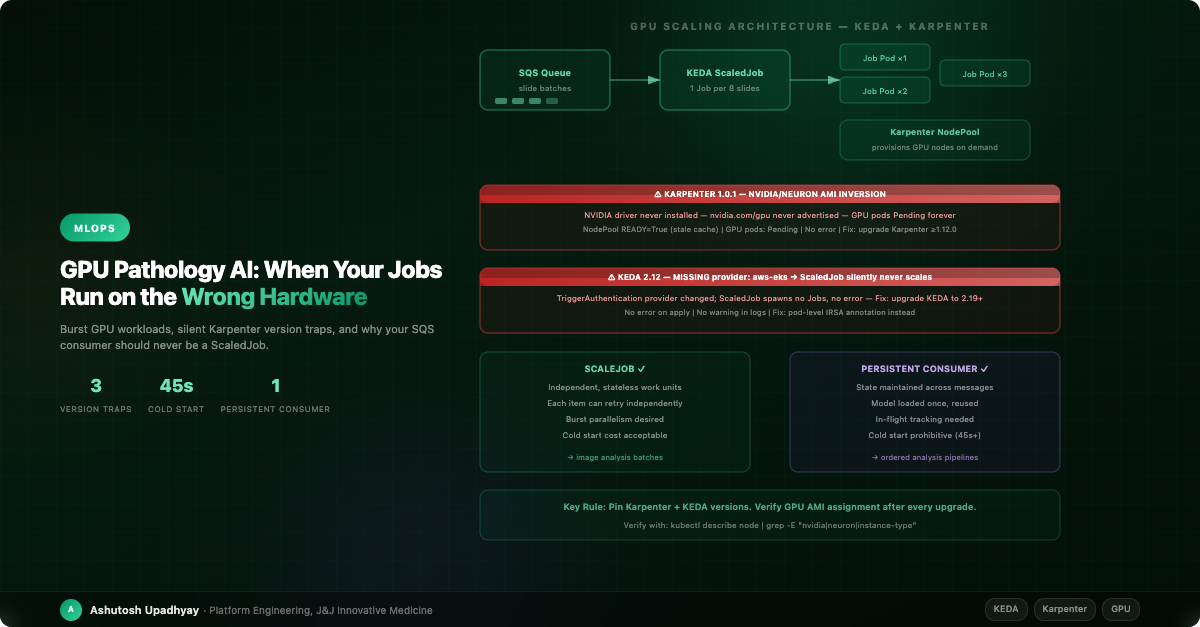
Burst GPU workloads, silent Karpenter and KEDA version traps, and when a ScaledJob is the wrong primitive.
Updated 4 October 2026 with technical corrections.
Our digital pathology AI pipeline was running smoothly. Whole-slide images arrived in batches of eight, a KEDA ScaledJob spawned inference pods on demand, Karpenter provisioned GPU nodes for them, and results streamed back to researchers. Then we checked another of our clusters before putting GPU work on it — one still running Karpenter 1.0.1.
On that version nothing completes. GPU pods sit Pending indefinitely — no error, no failed pod, no alarm — and the first signal is whoever is waiting for a result.
The NodePool reports READY=True. So does the EC2NodeClass. Everything looks healthy; the problem is only visible on the GPU node itself. Karpenter 1.0.1 inverts the AMI selection logic for AL2023: GPU instances are provisioned with the Neuron AMI variant instead of the NVIDIA one. The NVIDIA driver never installs. The NVIDIA device plugin never starts. nvidia.com/gpu is never advertised as an allocatable resource. The scheduler has nothing to schedule onto, so GPU pods wait forever.
The real lesson wasn't "CUDA calls fail on wrong hardware." It was: READY=True on the NodePool does not mean the GPU resource is allocatable. Here the status was accurate — the AMIs resolved fine; they were just the wrong ones. A separate problem on the same cluster showed how stale status can get: an old al2@latest alias that no longer resolves (EKS stopped publishing AL2 images after Kubernetes 1.32) had the controller logging a reconcile failure every 60 seconds, invisible to kubectl get, while the EC2NodeClass still reported READY=True. Status fields reflect the controller's last observation, not live device state.
That was the first of two version traps we hit over six months of running GPU workloads for AI image analysis at scale. This is what we learned.
Whole-slide image analysis is one of the most demanding workloads in biomedical AI. A single slide can be 50,000 × 50,000 pixels or more. Tissue segmentation, cell classification, and spatial phenotyping require GPU-accelerated inference with multi-gigabyte models loaded into VRAM. And the workload is inherently bursty: a pathologist submits ten slides at 09:00, needs results before lunch, then the queue is empty for hours.
Standard Kubernetes Deployments are the wrong tool here. Keeping a GPU node running 24/7 for a workload that's active three hours per day is expensive — a g5.xlarge (1× A10G) runs around $1/hr on-demand — and you're paying that around the clock for a workload that only uses it a few hours a day. On the other hand, the cold start time for spinning up a new node, pulling a 5GB image, and loading the model into GPU memory runs to several minutes. That's acceptable once per batch; it's not acceptable if it happens per message.
KEDA ScaledJobs solve the first problem elegantly: create one Kubernetes Job per N queue messages, let it run, let Karpenter deprovision the node when it's done. But ScaledJobs come with constraints that aren't obvious until you hit them in production.
KEDA offers two scaling primitives for queue-driven work: ScaledObject (scales a Deployment) and ScaledJob (creates a fresh Kubernetes Job per batch of messages — sized by the scaler's queueLength target — exits when done, scales to zero when the queue is empty). ScaledJob looks attractive for GPU workloads because it truly scales to zero. But there's a decision that matters more than which primitive you choose: is each unit of work independent?
| Criterion | ScaledJob ✓ | Persistent Consumer ✓ |
|---|---|---|
| Work unit independence | Each item retries independently | State maintained across messages |
| Model loading cost | Cold start per batch is acceptable | Model loaded once, amortized across many messages |
| Ordering requirements | None — parallel execution fine | Ordered or sequential processing needed |
| In-flight tracking | SQS visibility timeout is enough | Complex in-flight state requires persistent consumer |
| Burst pattern | True burst: idle for hours, then peak | Steady moderate load |
| Best for | Parallel image inference batches | Ordered analysis pipelines with model state |
For our image classification workload — stateless, parallelizable, GPU burst — ScaledJob was correct. For a separate downstream analysis pipeline that processed results in sequence and maintained state across slides in the same study, a persistent Deployment consuming SQS with an extended visibility timeout was the right answer.
The rule: If each work item is fully independent and can be retried by re-processing the message from scratch, use ScaledJob. If the consumer maintains any state across messages — a loaded model, an ordered cursor, an in-progress accumulation — use a persistent Deployment with a long visibility timeout (set to 2× your expected processing time and extend it during processing).
The mistake we almost made: using ScaledJob for the downstream pipeline because "it scales to zero." A ScaledJob that spawns one pod per message, each loading a 3GB model from scratch, would have spent 45 seconds per slide loading the model and 8 seconds running inference. The persistent consumer loads the model once and processes the entire batch in 8 seconds per slide. The apparent simplicity of ScaledJob would have cost 5× in runtime.
This is the trap that opened this post. Let's be precise about it.
Karpenter determines which AMI variant to use based on the amiFamily and instance type. For AL2023, GPU instances should get the NVIDIA variant; AWS Inferentia instances should get Neuron. In Karpenter 1.0.1, this variant selection was inverted for AL2023. GPU nodes booted with the Neuron AMI — which ships with the AWS Neuron runtime, not the NVIDIA driver. The device plugin never started, so the resource was never advertised.
Karpenter 1.0.1 trap (verified): GPU instances were provisioned with the Neuron AL2023 AMI variant. NVIDIA driver not installed → NVIDIA device plugin not started → nvidia.com/gpu never allocatable → GPU pods pending forever. NodePool and EC2NodeClass both showed READY=True — accurately, because the AMIs resolved; they were simply the wrong ones. The failure only surfaced on the node itself. (The reconcile failures every 60 seconds behind a stale READY=True came from the separate al2@latest alias that no longer resolves.)
The fix is straightforward: upgrade Karpenter to v1.0.3 or later (the AMI variant fix landed in PR #6976), where the AMI variant selection is corrected. Pin the AL2023 alias to a dated release in production and bump it through staging like any other GPU dependency — al2023@latest is fine for dev, but a new AMI release drifts every node onto it. Do not revert to AL2, which AWS stopped releasing for EKS after November 2025. Add a post-upgrade verification step to confirm the GPU resource is actually allocatable.
apiVersion: karpenter.k8s.aws/v1
kind: EC2NodeClass
metadata:
  name: gpu-nodeclass
spec:
  role: "KarpenterNodeRole-my-cluster"
  subnetSelectorTerms:
    - tags:
        karpenter.sh/discovery: my-cluster
  securityGroupSelectorTerms:
    - tags:
        karpenter.sh/discovery: my-cluster
  # Pin a dated AL2023 release in production (al2023@latest only in dev) — AL2 is end-of-life for EKS (Nov 2025)
  # The variant selection bug was fixed in Karpenter v1.0.3 (PR #6976) — a patch on the same minor line
  amiSelectorTerms:
    - alias: al2023@vYYYYMMDD   # the AL2023 release you validated in staging

---
apiVersion: karpenter.sh/v1
kind: NodePool
metadata:
  name: gpu-nodepool
spec:
  template:
    spec:
      nodeClassRef:
        group: karpenter.k8s.aws
        kind: EC2NodeClass
        name: gpu-nodeclass
      requirements:
        - key: "node.kubernetes.io/instance-type"
          operator: In
          values: ["g4dn.xlarge", "g4dn.2xlarge", "g5.xlarge", "g5.2xlarge"]
          # NEVER pin to a single instance type — this breaks the scheduler
        - key: "kubernetes.io/arch"
          operator: In
          values: ["amd64"]
Never pin to a single instance type. values: ["g4dn.xlarge"] removes the scheduler's ability to place the pod if that instance type is unavailable or at capacity. Always provide a family of compatible sizes. The scheduler picks the right size based on the pod's resource request.
After the upgrade, we added a post-upgrade verification step: submit one test job and immediately check kubectl describe node -l karpenter.sh/nodepool=gpu-nodepool | grep -E "instance-type|nvidia|neuron". This is now part of our Karpenter upgrade runbook.
The second trap looked like a scaling configuration issue but was actually a TriggerAuthentication field mismatch between our config and the KEDA version running on the cluster.
Our TriggerAuthentication had been written for a newer KEDA than the cluster was running. On that KEDA the apply succeeds and the TriggerAuthentication looks healthy — identityOwner has simply vanished. The scaler then can't authenticate, and ScaledJobs that use AWS-based queue triggers create no Jobs at all: the only signals are a KEDAScalerFailed warning in the ScaledJob's events and an authentication error in the operator log.
The root cause: a TriggerAuthentication field mismatch between the KEDA version you're running and the config you're applying can make the operator's SQS queue-depth read fail authentication. With no queue depth returned, KEDA spawns no Jobs. The podIdentity block evolved across KEDA releases: aws-eks is the older provider value (deprecated, still accepted), while provider: aws and podIdentity.identityOwner both arrived in v2.13.0. On an older KEDA, a config written for the newer shape loses identityOwner silently — the CRD doesn't know the field, so it is pruned at admission — and the aws provider isn't recognised. Validate every TriggerAuthentication against the CRD schema of the version you actually deployed.
TriggerAuthentication drift trap: A config written for the newer provider: aws ran on a KEDA release that predated it, so identityOwner was pruned at admission and the operator's SQS queue-depth check failed. The apply reported no error; only the ScaledJob's events showed the failure. No Jobs were spawned, and the queue kept growing. Symptom: ScaledJob exists, trigger is configured, queue is non-empty — but kubectl get jobs shows nothing being created, and the ScaledJob's events carry a KEDAScalerFailed warning. Fix: upgrade KEDA (provider: aws needs 2.13 or later) and validate your TriggerAuthentication against the CRD schema of the version you run, immediately after every upgrade.
Two fields to know — they are distinct and both matter:
TriggerAuthentication.spec.podIdentity.provider — selects the identity mechanism. Valid values in current KEDA: aws, aws-eks (deprecated), gcp, azure-workload, none. This is the field that drifts between KEDA versions.TriggerAuthentication.spec.podIdentity.identityOwner (keda or workload) and roleArn — with provider: aws, these decide which IAM principal polls the queue: by default the KEDA operator's own role; roleArn or identityOwner: workload switch it to another role, which must then trust the KEDA operator. The older trigger-level identityOwner (pod or operator) only applies to the deprecated aws-eks provider and is silently ignored under aws — which is exactly how an inherited config changes credentials without anyone noticing.# TriggerAuthentication — correct location for identity config (not ScaledJob spec)
apiVersion: keda.sh/v1alpha1
kind: TriggerAuthentication
metadata:
name: pathology-ai-trigger-auth
namespace: pathology
spec:
podIdentity:
provider: aws # Valid values: aws | aws-eks (deprecated) | gcp | azure-workload | none
# No roleArn/identityOwner: KEDA polls SQS with its own operator role, so grant that role
# sqs:GetQueueAttributes. roleArn (or identityOwner: workload) switches to another role,
# which must then trust the KEDA operator.
---
# ScaledJob references the TriggerAuthentication
spec:
triggers:
- type: aws-sqs-queue
authenticationRef:
name: pathology-ai-trigger-auth
metadata:
queueURL: https://sqs.us-east-1.amazonaws.com/123456789012/pathology-jobs
awsRegion: us-east-1
# no identityOwner here: under provider: aws a trigger-level identityOwner is ignoredAfter any KEDA upgrade, immediately submit one test message and confirm a Job is spawned within 60 seconds. Quiet non-scaling is the failure mode: a KEDAScalerFailed event and no Jobs. Alert on the event as well as the queue.
Our downstream analysis pipeline required ordered processing: each slide's analysis depended on the previous slide's result. It also maintained a loaded model in memory that took 45 seconds to initialize from cold.
A ScaledJob would have created one Job per message, each loading the model fresh. With a 45-second cold start and 8 seconds of actual inference per slide, a queue of 20 slides in this ordered, sequential pipeline would have taken 20 × 53 = 1,060 seconds wall-clock vs 45 + 20 × 8 = 205 seconds for a persistent consumer (wall-clock for the ordered pipeline described; ScaledJob would parallelize stateless work, making the elapsed-time gap smaller). The persistent consumer is 5× faster here — not because it's cleverer, but because it amortizes the fixed cost across a sequential workload that cannot be parallelized.
apiVersion: apps/v1
kind: Deployment
metadata:
  name: analysis-consumer
spec:
  replicas: 1
  selector:
    matchLabels:
      app: analysis-consumer
  template:
    metadata:
      labels:
        app: analysis-consumer
    spec:
      containers:
      - name: consumer
        image: pathology-ai:v1.2.0
        env:
        - name: SQS_QUEUE_URL
          value: "https://sqs.us-east-1.amazonaws.com/123456789012/analysis-queue"
        - name: VISIBILITY_TIMEOUT
          value: "600"  # 2× worst-case processing time per message
        - name: VISIBILITY_EXTENSION_INTERVAL
          value: "120"  # Extend visibility every 2 minutes during processing
The consumer extends the SQS visibility timeout while it's processing. If the pod dies mid-processing, the message becomes visible again after the timeout expires and another consumer picks it up. This is the correct pattern for long-running GPU inference with model state: one consumer, long visibility timeout, explicit extension.
This one is specific to whole-slide image analysis pipelines that write overlay files. When generating analysis results as overlay TIFFs for display in WSI viewers, the image metadata is encoded as OME-XML in the TIFF ImageDescription tag.
The OME standard uses Unicode — the micrometre symbol (µm) appears in pixel calibration values, stain names include non-ASCII characters, and annotation identifiers sometimes contain Unicode. If you pass the ImageDescription as a plain Python string to tifffile, the library raises a ValueError: TIFF strings must be 7-bit ASCII immediately at write time — a loud, fail-fast error that's hard to miss.
OME-XML encoding trap: Passing the ImageDescription XML as a plain Python string raises ValueError: TIFF strings must be 7-bit ASCII at write time — no file is written. The fix is to pass UTF-8 bytes instead. The subtler risk is earlier in your pipeline: if you've substituted "um" for "µm" to avoid the error, you've introduced a non-standard OME unit that a downstream viewer may misinterpret, silently misaligning the physical scale of the overlay.
import tifffile

# WRONG — raises ValueError: TIFF strings must be 7-bit ASCII if XML contains µm
tiff.write(description=xml_string)

# ALSO WRONG — "um" is not a valid OME unit; viewer may misread physical scale
tiff.write(description=xml_string.replace("µm", "um"))

# CORRECT — UTF-8 bytes preserves all Unicode in OME-XML
tiff.write(description=xml_string.encode("utf-8"))
The fix is one method call. The lesson is to encode as UTF-8 bytes and never substitute Unicode characters — "um" for "µm" looks harmless but breaks the OME unit namespace.
After six months of GPU workload production, here's the pattern we'd build from scratch today:
al2023@latest only in dev), post-upgrade GPU verification step in runbooksuccessfulJobsHistoryLimit: 3 for debugging.provider: aws, and queue-read access for the identity KEDA actually polls with (the operator role unless you set roleArn or identityOwner: workload). Validate against the current KEDA CRD schema after every upgrade. Submit one test message immediately after upgrade.The upgrade checklist that would have caught everything: After any Karpenter or KEDA version change, (1) spawn a test ScaledJob that runs nvidia-smi and logs the GPU model, (2) check the spawned node's instance type matches the NodePool's instance family, (3) confirm the identity KEDA polls with can still read the queue's attributes, and that the Job pod's own role can still do its work (for example, a test S3 operation). Ten minutes of validation prevents silent failures that surface only when a result is late.
The most common mistake is treating GPU scheduling as solved once the first workload runs. Karpenter and KEDA are both under active development with frequent releases. Each release can change behavior that worked correctly before — sometimes with a warning in the changelog, sometimes not.
The second mistake is treating status fields as ground truth. READY=True on a NodePool is the controller's last recorded view — it can stay True while every reconcile since has failed, and it does not mean the GPU resource is allocatable right now. Running on a pod means the container started — it does not mean the GPU operation completed. Your upgrade runbook needs an active verification step that checks the actual resource, not the status field.
The third mistake is the ScaledJob-for-everything trap. ScaledJob's scale-to-zero is genuinely powerful for burst workloads. But the 45-second model load (plus node start-up when a new node is needed) means it's only appropriate when the work unit is large enough to justify the initialization cost. For small, frequent units of work with shared model state, you're paying the cold start tax on every message.
Digital pathology AI is demanding infrastructure — GPU bursts, large model payloads, strict ordering requirements for downstream analysis, and results that researchers depend on. Getting the scaling pattern right matters. Getting the version traps documented matters more.
nvidia-smi.pollingInterval is 30s, so allow time for a full reconcile cycle). Quiet non-scaling is the failure mode — the queue fills while the only error sits in the ScaledJob's events.ValueError at write time. Never substitute "um" for "µm" — it breaks the OME unit namespace.Follow-up (October 2026): Same Model, Different Answers: Moving a Research Pipeline into a Production Service — the weights matched and the tiling matched, yet the outputs did not: dependency pins as part of the model, a changed framework default, and output formats that only the consumer can judge.
Disclaimer: The views and opinions expressed in this post are my own and do not represent those of my employer or any organisation I am associated with.